Running Ubuntu Containers with Hyper-V Isolation on Windows

Dustin Kirkland

on 13 September 2017
This article is more than 8 years old.


Canonical and Microsoft have teamed up to deliver an truly special experience — running Ubuntu containers with Hyper-V Isolation on Windows 10 and Windows Servers!

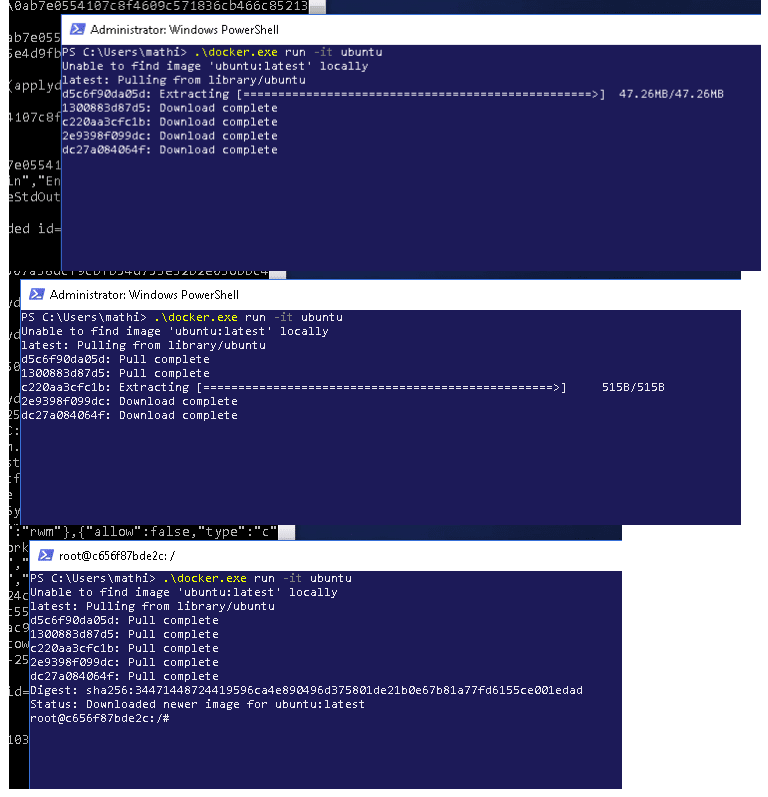
We have published a fantastic tutorial at https://ubu.one/UhyperV, with screenshots and easy-to-follow instructions.  You should be up and running in minutes!

Follow that tutorial, and you’ll be able to launch Ubuntu containers with Hyper-V isolation by running the following directly from a Windows Powershell:

  • docker run -it ubuntu bash

Cheers!
Dustin

Talk to us today

Interested in running Ubuntu in your organisation?

Newsletter signup

Get the latest Ubuntu news and updates in your inbox.

By submitting this form, I confirm that I have read and agree to Canonical's Privacy Policy.

Related posts

Dirty Frag Linux kernel local privilege escalation vulnerability mitigations

Two local privilege escalation (LPE) vulnerabilities affecting the Linux kernel have been publicly disclosed on May 7, 2026. One of the vulnerabilities has...

Three weeks to go: A sneak peek of the Ubuntu Summit 26.04 experience

The countdown to the Ubuntu Summit is officially on! We are just three weeks away from Ubuntu Summit 26.04, and the orange energy levels in our community...

How to use Ubuntu on Windows

Why run Ubuntu on Windows? It’s about getting the best of both worlds.